

AI coding agents write code faster than any of us. They also misread vague requirements, implement half a feature, quietly weaken a test until it passes, and report DONE without having checked. A better prompt fixes none of this reliably, because the problem is not the prompt. Its the missing engineering process around the agent.
You are reading a two part series on AIFSD with SDD, TDD and harness engineering. This is part one, part 2 link is here .
Source code availabe at github: https://github.com/alagesann/aifsd-sdd-tdd-harness
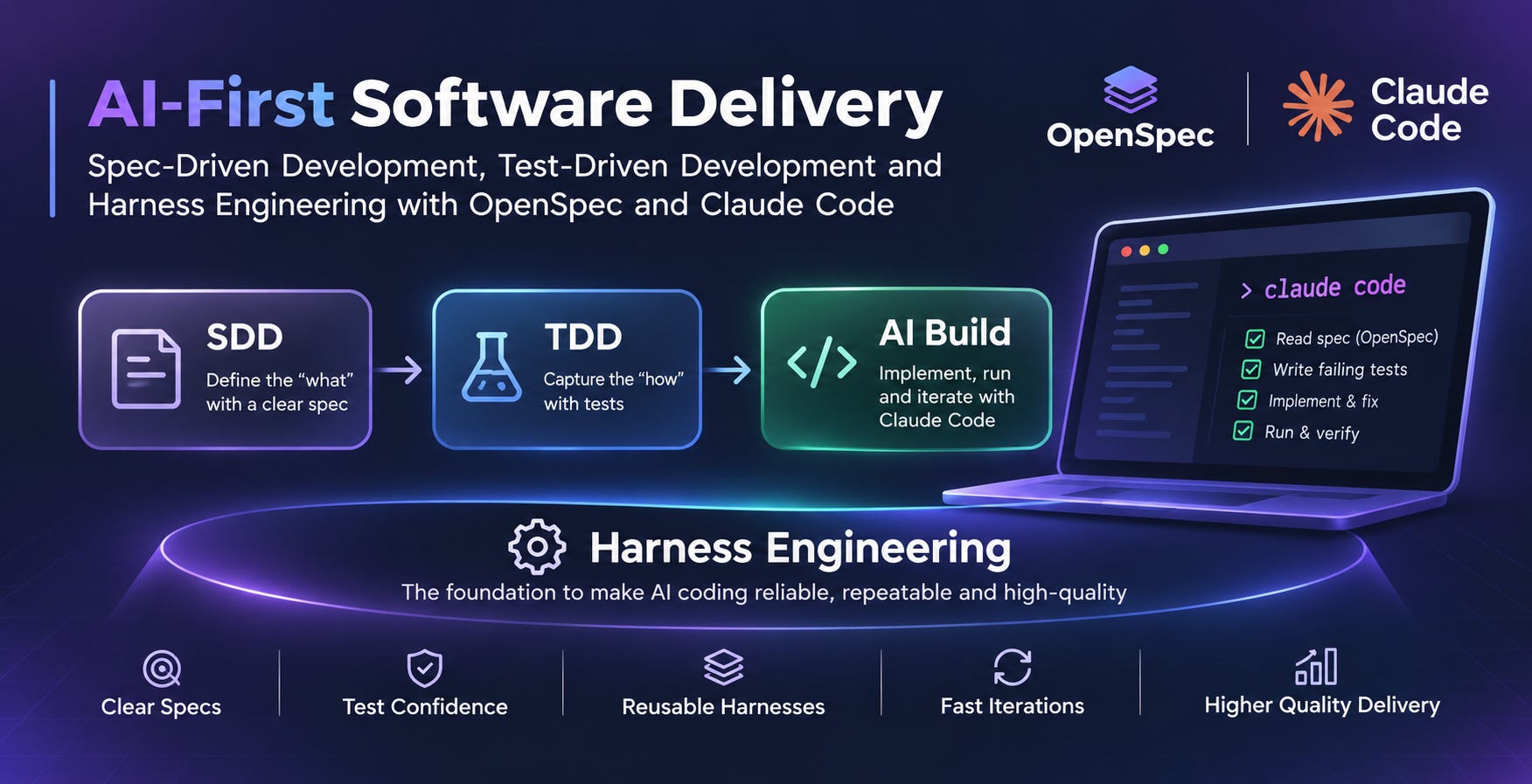
This post combines three practices that each close one of those gaps, and shows them working together on a real feature:

Specifications define the intended behaviour. Tests prove the behaviour. The harness makes the agent follow both, every time.
The example is API rate limiting for a TypeScript service (Node.js, Fastify, Vitest). Every terminal command, code listing and output below comes from a real run, using OpenSpec 1.14.3, Node.js 25.6, Fastify 5.12, Vitest 4.1, TypeScript 5.9 and StrykerJS 10.1.
1. The three practices in brief
Spec-driven development with OpenSpec
SDD means the coding agent works from an explicit, reviewed specification instead of a chat message(prompt). OpenSpec adds two ideas that matter for a codebase that keeps changing:
Specs are the source of truth.
openspec/specs/<capability>/spec.mddescribes how the system behaves today.Changes are proposals against them. Each change lives in
openspec/changes/<name>/until it ships. Then its archived, and its spec deltas are merged into the main specs.
A change holds four artifacts:

Specs follow a strict grammar. Every ### Requirement: states behaviour with SHALL or MUST, and every requirement needs at least one #### Scenario: with concrete WHEN and THEN steps (GIVEN is optional). That scenario rule is what later lets us map each piece of behaviour to a test.
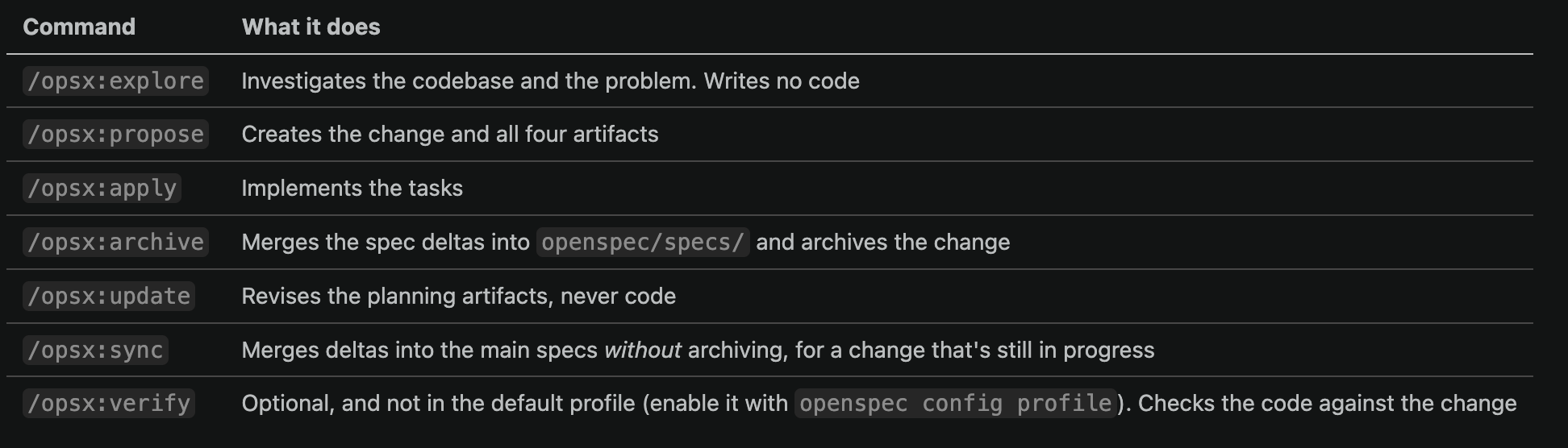
In Claude Code, OpenSpec installs these slash commands:
Test-driven development, and why agents need it more than we do
TDD is the familiar loop: write a test and watch it fail (RED), write the least code that makes it pass (GREEN), then clean up with the tests still passing (REFACTOR).
Is TDD relevant even at the age of AI first software development? you ask. yes, very much it is. in fact, its one of the favorite workflows for anthropic.
With an agent, TDD stops being a fancy preference and becomes the feedback mechanism. Instead of trusting the agent’s opinion of its own code, you give it an executable definition of “correct” that it can run, fail and fix against. Two details make the difference:
The RED must be meaningful. A valid RED is a failing assertion about the behaviour you are about to build.
Green tests not prove the spec is met. They prove the code matches the tests. If the agent misreads the spec, it writes the tests and the code from the same misreading, and they agree with each other while both being wrong. These are correlated mistakes, and only an independent check catches them: a human reviewing the spec, a scenario-to-test map, or a reviewer with a separate context.
Harness engineering: guides and sensors
Harness engineering is the work of designing everything around the model: instructions, tools, checks and feedback loops. Birgitta Böckeler’s model splits a harness into two kinds of control:
Guides (feedforward) steer the agent before it acts: project context, rules, specs, skills.
Sensors (feedback) check its work after it acts, and feed failures back so it can correct itself: type checks, tests, coverage checks, review agents.
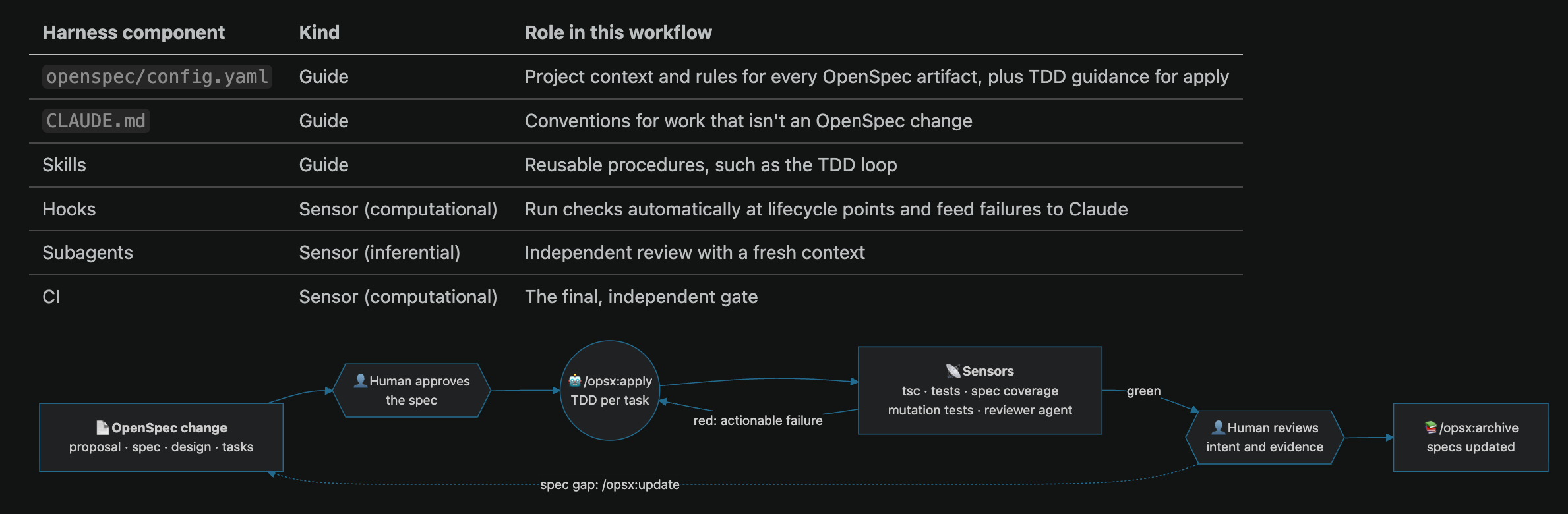
Each can be computational (deterministic, cheap, run on every change) or inferential (another model judging the work, which is slower and less certain). In Claude Code they map like this:
2. Worked example: rate limiting an Orders API
The Orders API is a small Fastify service. Product wants each API key limited to 100 requests per minute, with HTTP 429 for anything over, independent counters per key, and correct behaviour under concurrent requests.
Notice what that brief leaves open. Does per minute mean a fixed window (counters reset every 60 seconds) or a sliding one (any 60-second span)? They behave differently: a fixed window can let a client send up to 200 requests in about a second, either side of a reset. An agent will silently pick one. The spec is where a human picks it on purpose.
Before you start
To follow along, you need:
Node.js 24 or later, which runs TypeScript files directly, and git.
A small Fastify project:
src/app.tsexportingbuildApp()with aGET /ordersroute, plus Fastify, TypeScript, Vitest and@types/nodeinstalled. Intsconfig.json, set"noEmit": trueand"allowImportingTsExtensions": true, so imports can end in.ts.These scripts in
package.json.checkalso needsscripts/spec-coverage.mjs, which you add in step 5:
"scripts": {
  "test": "vitest run",
  "typecheck": "tsc --noEmit",
  "check": "openspec validate --all --strict && tsc --noEmit && vitest run && node scripts/spec-coverage.mjs"
}
OpenSpec:
npm i -D @fission-ai/openspec@1.14, thennpx openspec init --tools claude.The
openspec/config.yamlfrom section 3. Its rules only shape artifacts written after they exist, and they are what keep the proposal small enough to review. Section 3 explains the rules, and step 4 explains the apply guidance.An initial commit. The Stop hook in section 3 compares against
git HEAD.
Step 1: Explore
/opsx:explore We need per-API-key rate limiting in the Orders API.
Investigate how requests flow through Fastify, where API keys are read,
whether any rate-limiting library is already in use, and how tests are written.
List the open decisions (window type, storage, response format) with trade-offs.
Do not write code.
Explore is for questions, not answers. Its most useful output here is the list of open decisions, especially the window type and where the counter lives. Settle them before you propose.
Step 2: Propose
/opsx:propose add-rate-limiting: 100 requests per API key per fixed 60-second window,
HTTP 429 with Retry-After when exceeded, independent keys, correct under concurrent
requests. In-memory store behind an interface so Redis can replace it later.
Out of scope: per-route limits, multi-instance counting.
OpenSpec creates the change:
openspec/changes/add-rate-limiting/
├── proposal.md
├── specs/rate-limiting/spec.md
├── design.md
└── tasks.md
Propose may stop and ask clarifying questions first. For this feature, expect questions such as what should happen to requests with no API key, and whether a window starts at a keys first request or on the clock minute. Answer them, because each answer becomes a scenario. The spec in this post deliberately leaves the keyless case open, so you can see what mutation testing makes of it in step 5.
Then check the size of what comes back. Without the review budgets in section 3’s config, a first proposal for this feature can easily run to >20 scenarios and a ten part design (section 4 explains why that matters).
Step 3: Review the spec (the human checkpoint)
This is the most valuable 10 minutes in the whole workflow. Heres what an under-specified spec looks like, with requirements but no scenarios:
### Requirement: API Rate Limiting
The system SHALL enforce a maximum of 100 requests per API key
within a rolling 60-second window.
OpenSpec rejects it before anyone writes code:
$ npx openspec validate add-rate-limiting --strict
✗ [ERROR] rate-limiting/spec.md: ADDED "API Rate Limiting" must include at least one scenario
✗ [ERROR] rate-limiting/spec.md: ADDED "Rate Limit Response" must include at least one scenario
✗ [ERROR] rate-limiting/spec.md: ADDED "Independent API Keys" must include at least one scenario
Validation catches the grammar. The review catches the meaning. The approved spec makes the window explicit, puts a scenario exactly on every numeric boundary (request 100 allowed, request 101 rejected, 1 ms before the reset still blocked), and turns "handled safely" into a number someone can test:
## Purpose
Limit how often each API key can call the Orders API, so one client cannot starve the others.

## ADDED Requirements

### Requirement: Per-key request limit
The system SHALL allow at most 100 requests per API key in each fixed 60-second window,
and SHALL reject further requests in that window with HTTP 429 and a `Retry-After`
header giving the seconds until the window resets.

#### Scenario: Last request within the limit is allowed
- **GIVEN** API key `key-a` has made 99 requests in the current window
- **WHEN** it makes another request
- **THEN** the response is HTTP 200

#### Scenario: Request over the limit is rejected
- **GIVEN** API key `key-a` has made 100 requests in a window that started 20 seconds ago
- **WHEN** it makes another request
- **THEN** the response is HTTP 429 with header `Retry-After: 40`

### Requirement: Independent keys
The system SHALL count requests separately for each API key.

#### Scenario: Another key is unaffected
- **GIVEN** API key `key-a` has made 100 requests in the current window
- **WHEN** API key `key-b` makes its first request
- **THEN** the response is HTTP 200

### Requirement: Fixed window reset
A key's window SHALL start at its first request and reset exactly 60 seconds later.

#### Scenario: Still limited 1 ms before reset
- **GIVEN** API key `key-a` made 100 requests in a window that started at t=0
- **WHEN** it makes a request at t=59.999 s
- **THEN** the response is HTTP 429

#### Scenario: Allowed again at reset
- **GIVEN** API key `key-a` made 100 requests in a window that started at t=0
- **WHEN** it makes a request at t=60 s
- **THEN** the response is HTTP 200

### Requirement: Concurrent request safety
The limit SHALL hold when requests for the same key arrive concurrently.

#### Scenario: Burst of concurrent requests
- **GIVEN** API key `key-c` has made no requests
- **WHEN** 150 requests for `key-c` arrive concurrently
- **THEN** exactly 100 responses are HTTP 200 and 50 are HTTP 429
Tip: give a new capability a ## Purpose in its delta spec. OpenSpec reads it only when it creates the capability. Without one, archive writes a TBD placeholder into openspec/specs/, and openspec validate --all --strict then fails on that main spec until someone edits it by hand.
The design records the decisions a reviewer should challenge:
## Decisions
- **Fixed window, not sliding.** Simple and cheap. Trade-off accepted: a client can send up to 200 requests across a window boundary. Rejected: sliding log (memory per request).
- **Pure decision, injected clock.** `decide(count, windowStart, now)` is pure; `Clock` is injected so tests control time.
- **Atomic increment in the store.** `CounterStore.increment(key, now)` reads, resets and increments in one step with no `await` in between. This change uses an in-memory store only. A future shared store (for example Redis, for multiple instances) must keep `increment` atomic too.
Review against a short checklist:
Does every requirement have a scenario with concrete values?
Does every numeric boundary have a scenario?
Does every concurrency rule say where it’s made atomic?
Is anything in the proposal’s scope missing from the spec?
If anythings wrong, fix the artifacts with /opsx:update. Do not start apply against a spec you would n’t sign.
Step 4: Apply, with TDD inside it
TDD is not a separate phase or a replacement for /opsx:apply. Apply decides what to build next (the next unticked task). TDD decides how each task gets built.
You could paste TDD instructions into every apply prompt, but they would be forgotten by the next session. Put them in openspec/config.yaml instead, where OpenSpec hands them to apply every time (see the example below):
operations:
  apply:
    guidance:
      - Work one task at a time using TDD - write the failing test, run it, and show the RED output before writing production code
      - A valid RED is a failing assertion; a compile, import or setup error is not
      - 'Name each test that covers a spec scenario "[scenario: <capability>/<exact scenario name>]"'
      - Never edit or weaken an approved test to make it pass; stop and ask instead
      - Tick a task in tasks.md only after the check that task names passes (for a test-writing task, the expected RED)
      - Before finishing the change, run npm test and npm run typecheck; both must pass
You can confirm the agent will receive it: openspec instructions apply --change add-rate-limiting --json now includes an operationGuidance array with those five lines. Then run:
/opsx:apply add-rate-limitingOne task at a time
The loop runs once per task: test, RED, code, GREEN, refactor, tick the task, then on to the next. Writing every test for the whole change first produces a wall of failures that hides which one matters, and it pushes the agent to code against all of them at once, thats not how even a regular TDD flow works with real developers.
The first RED
Your agent’s tasks and file names will differ from the ones below. It may, for example, split the code into policy.ts, memory-store.ts and plugin.ts. What should match is the shape of each cycle.
The first scenario tests drive the app through Fastify’s inject and control time with a fake clock, so nothing ever sleeps:
// test/fake-clock.ts
export class FakeClock {
  private t = 0;
  now() { return this.t; }
  advance(ms: number) { this.t += ms; }
}
// test/rate-limit.test.ts
import { describe, it, expect } from "vitest";
import { buildApp } from "../src/app.ts";
import { FakeClock } from "./fake-clock.ts";
function setup() {
const clock = new FakeClock();
return { app: buildApp({ clock }), clock };
}
const get = (app: ReturnType<typeof buildApp>, key: string) =>
app.inject({ method: "GET", url: "/orders", headers: { "x-api-key": key } });
async function send(app: ReturnType<typeof buildApp>, key: string, n: number) {
for (let i = 0; i < n; i++) await get(app, key);
}
describe("rate limiting", () => {
it("[scenario: rate-limiting/Last request within the limit is allowed]", async () => {
const { app } = setup();
await send(app, "key-a", 99);
expect((await get(app, "key-a")).statusCode).toBe(200);
});
it("[scenario: rate-limiting/Request over the limit is rejected]", async () => {
const { app, clock } = setup();
await send(app, "key-a", 100);
clock.advance(20_000);
const res = await get(app, "key-a");
expect(res.statusCode).toBe(429);
expect(res.headers["retry-after"]).toBe("40");
});
});There are two different failures at this point, and only one of them is a RED:
$ npx tsc --noEmit
test/rate-limit.test.ts(7,26): error TS2554: Expected 0 arguments, but got 1.
Thats a compile error: buildApp doesnt accept a clock yet. It says nothing about rate limiting. (Vitest strips types without checking them, so the tests still run. Thats why tsc belongs in the checks too.) The test run gives the real RED, a failing assertion about the behaviour:
$ npx vitest run
 ❯ test/rate-limit.test.ts (2 tests | 1 failed)
     × [scenario: rate-limiting/Request over the limit is rejected]

AssertionError: expected 200 to be 429 // Object.is equality
 ❯ test/rate-limit.test.ts:27:28
     27|     expect(res.statusCode).toBe(429);
That RED only appeared because buildApp happens to ignore an argument it doesnt know. A more reliable way: before writing a task’s tests, write a stub with the real signature that returns a wrong value, such as a store increment that always returns { count: 0, windowStart: 0 }. Everything compiles, and the test that needs the missing behaviour fails on an assertion. If a stub makes a test pass that should fail, change the stub, not the test. Agents following the apply guidance often do this on their own.
Notice that the other test, "Last request within the limit is allowed", passed even though no rate limiting existed yet. It checks that the 100th request gets HTTP 200, and without a limiter every request gets 200. So right now it can't fail, and a test that can't fail protects nothing. It becomes useful once the limiter exists: if the code blocks one request too early (count < LIMIT instead of count <= LIMIT), request 100 gets a 429 and this test fails. Mutation testing (step 5) confirms that it really catches this.
Next comes the minimum code to go GREEN: a pure decide function, a counter store behind an interface, and a Fastify onRequest hook that wires them together. The store appears in the next section, because its first version had a bug.
// src/rate-limit/decide.ts
export const LIMIT = 100;
export const WINDOW_MS = 60_000;

export type Decision = { allowed: true } | { allowed: false; retryAfterSec: number };

/** Pure rule: given this request's count in the window, allow or reject it. */
export function decide(count: number, windowStart: number, now: number): Decision {
  if (count <= LIMIT) return { allowed: true };
  return { allowed: false, retryAfterSec: Math.ceil((windowStart + WINDOW_MS - now) / 1000) };
}
// src/rate-limit/index.ts
import type { FastifyInstance } from "fastify";
import { decide } from "./decide.ts";
import { MemoryCounterStore, type Clock, type CounterStore } from "./store.ts";
export type { Clock, CounterStore };
export function registerRateLimit(
app: FastifyInstance,
{ clock = { now: () => Date.now() }, store = new MemoryCounterStore() }: { clock?: Clock; store?: CounterStore } = {},
) {
app.addHook("onRequest", async (req, reply) => {
const key = req.headers["x-api-key"];
if (typeof key !== "string") return; // requests without an API key are not limited
const now = clock.now();
const { count, windowStart } = await store.increment(key, now);
const decision = decide(count, windowStart, now);
if (!decision.allowed) {
return reply.code(429).header("retry-after", String(decision.retryAfterSec)).send({ error: "rate_limited" });
}
});
}// src/app.ts
import Fastify from "fastify";
import { registerRateLimit, type Clock, type CounterStore } from "./rate-limit/index.ts";
export function buildApp(options: { clock?: Clock; store?: CounterStore } = {}) {
const app = Fastify();
registerRateLimit(app, options);
app.get("/orders", async () => ({ orders: [] }));
return app;
}$ npx tsc --noEmit && npx vitest run
Tests 2 passed (2)Continue part 2 here