

Series: VectorRAG and GraphRAG, Hands-On Part 1: Retrieval-Augmented Generation - Offline Indexing pipeline (you are here) · Part 2: Online retrieval pipeline and measurement · Part 3: GraphRAG, When Connections Matter (Coming next)
tl;dr: An LLM is a brilliant student writing a closed-book exam. It answers confidently from memory, even about your company’s leave policy, which it has never read. RAG (Retrieval-Augmented Generation) turns it into an open-book exam. Before the LLM answers, you search your own documents where information is available and hand it the few pages that matter.
In this part we build RAG by hand on a small fictional company’s documents. The stages are naive vector search → chunks that carry their own “address” → hybrid search → reranking and contextual retrieval. We measure each step instead of assuming it helps. Some steps helped a lot, and one made a question worse. One kind of question, where the answer has to be pieced together from several documents, failed no matter what we did. That kind of question is why Part 2 exists.
Source code: rag-project. Every retrieval number in this post comes from running that code. Steps that call the Claude API are clearly marked.
The problem: a confident new joiner
Picture a smart fresher on day one. Top of the batch, read every book, very confident. You ask:
“How many earned leave days can I carry forward to next year?”
Without blinking: “Most companies allow 10 to 30 days.”
Not wrong for “most companies”, and no use to you. Your company’s rule is in the HR policy, which this fresher hasn’t opened yet.
An LLM is exactly this fresher. It has read a huge amount of public text, so it reasons and writes beautifully. But it has never seen your documents: your HR policies, client contracts, project charters, incident reports or last month’s newsletter. Ask it about them and it does what a confident fresher does. It gives a plausible answer from general knowledge, or simply makes something up.
There are three ways to fix the fresher:
Send them to a coaching class for months so they memorise the policies. This is fine-tuning: expensive, slow, and out of date the moment a policy changes.
Hand them the full policy document every time they answer. This is long context. It works when the document is small.
Teach them to look up the right page before answering. This is RAG.
What is RAG? The open-book exam
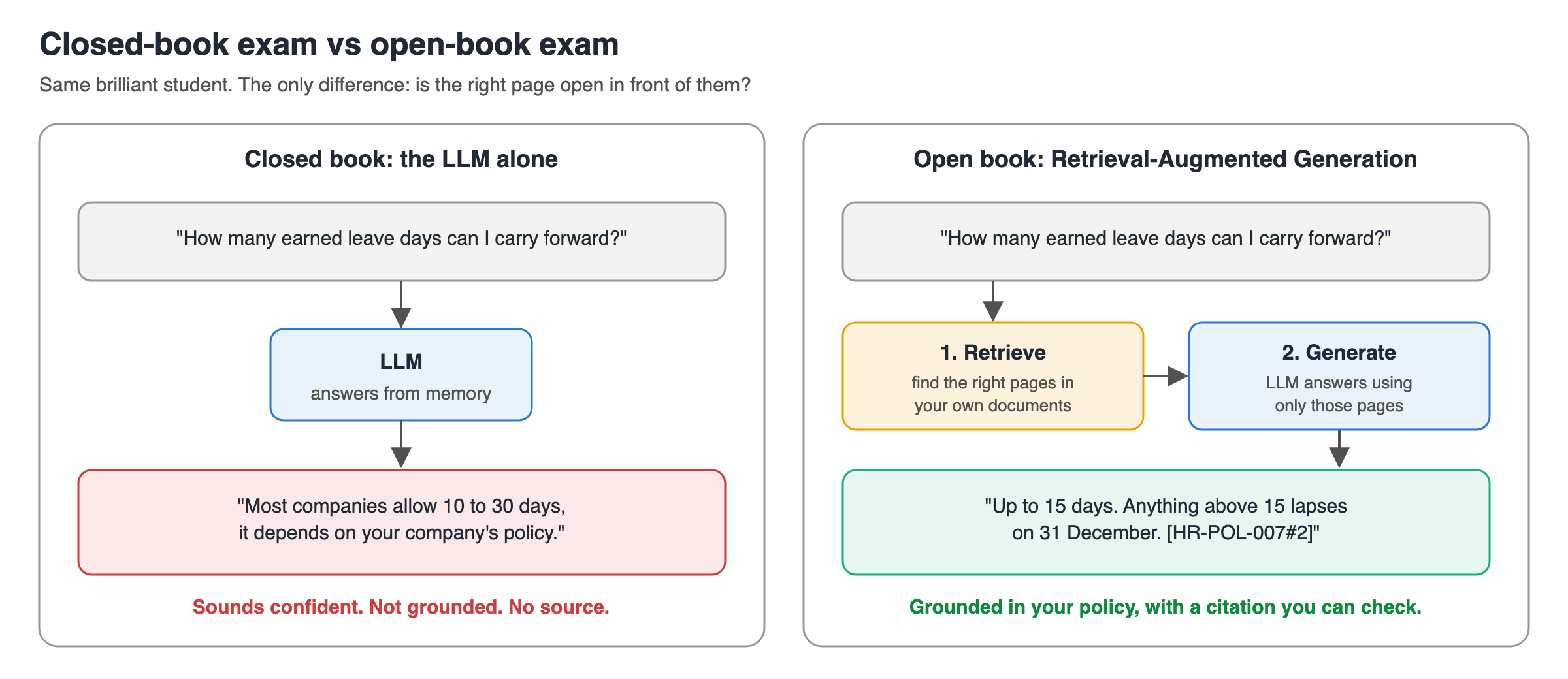
Retrieval-Augmented Generation means exactly what the words say:
Retrieval: search your own documents for the passages relevant to the question.
Augmented: add those passages to the prompt.
Generation: the LLM writes the answer using those passages.
It’s the difference between a closed-book exam and an open-book exam. The student is the same. What changes is whether the right page is open in front of them.
Two things follow from this, and they shape everything else in this post:
The LLM can only be as good as what you retrieve. If the right page isn’t in the context, the best model in the world will still guess or say “I don’t know”. Most RAG problems are retrieval problems, not LLM problems.
The answer can cite its source. Each passage carries an id, so the answer can say “[HR-POL-007#2]” and the reader can check it. For HR, legal and banking answers, that check is the whole point.
RAG vs fine-tuning
People often ask: “Why not fine-tune the model on our documents?”
Fine-tuning is the coaching class. It’s good for teaching a skill or style, like writing in your company’s tone or following a strict output format. It’s a poor way to teach facts that change. Facts get blurred during training, you can’t cite where an answer came from, and every policy update means another training run.
RAG is the guidebook in your pocket. The facts stay in the documents, and you just look them up. In practice most teams use RAG for knowledge, and fine-tune only for behaviour, if at all.
First question: do you even need RAG?
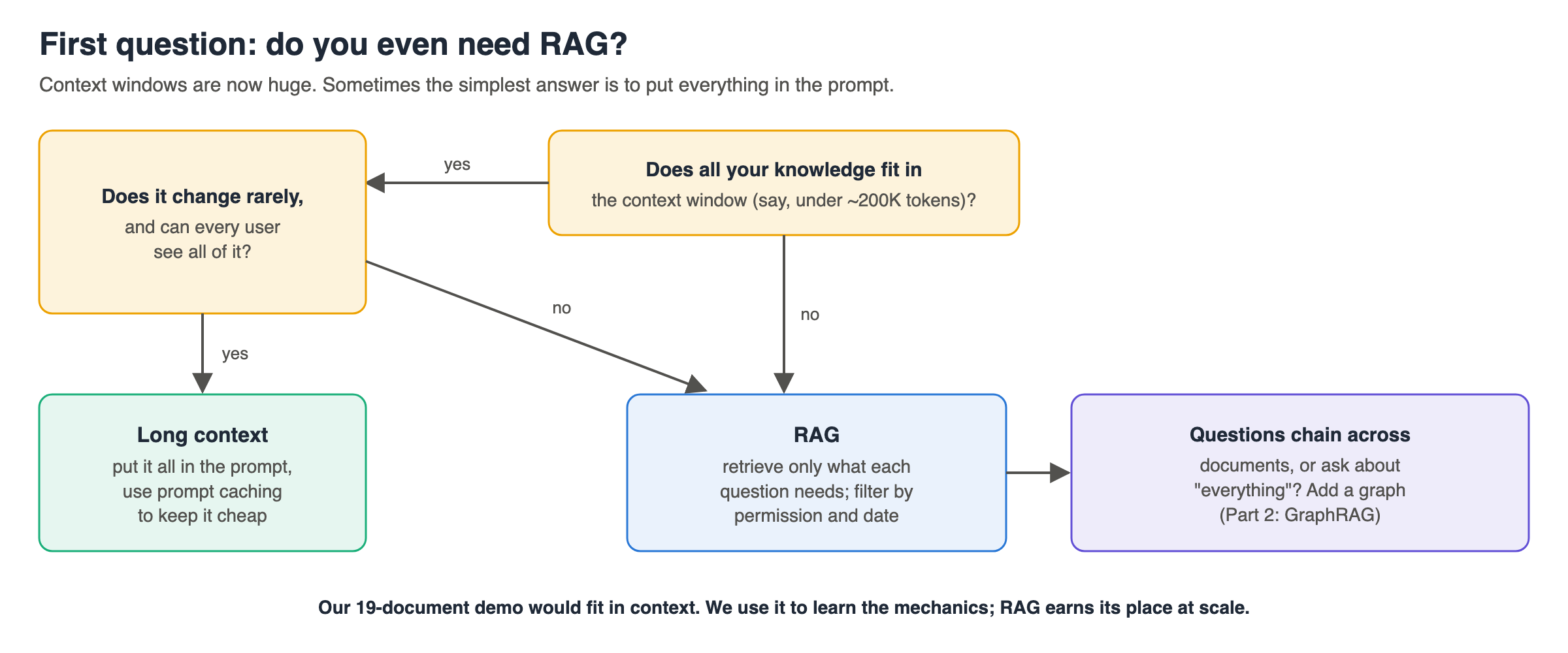
Context windows are now huge (Claude models take up to 1M tokens). One common rule of thumb: if your whole knowledge base fits in about 200K tokens (roughly 500 pages) and rarely changes, you can skip retrieval entirely. Put everything in the prompt and use prompt caching so you don’t pay full price for the same pages on every question.
The research agrees, with nuance. A widely cited Google DeepMind study found that long context beats RAG on average answer quality when the model has the resources, while RAG is far cheaper in tokens. Which one wins depends on the model, the task and the data.
RAG earns its place when:
the documents are too large for the context window, or too expensive to send on every question
documents change often, so a cached prompt keeps going stale
different users may see different documents, so you must filter before the LLM reads anything
you need citations to specific passages
Please note: our demo company has only 19 short documents, about 4,500 tokens. That would fit in the context window easily. We use it because it’s small enough to understand completely. Every technique in this post matters more as your document count grows.
How RAG works: two pipelines
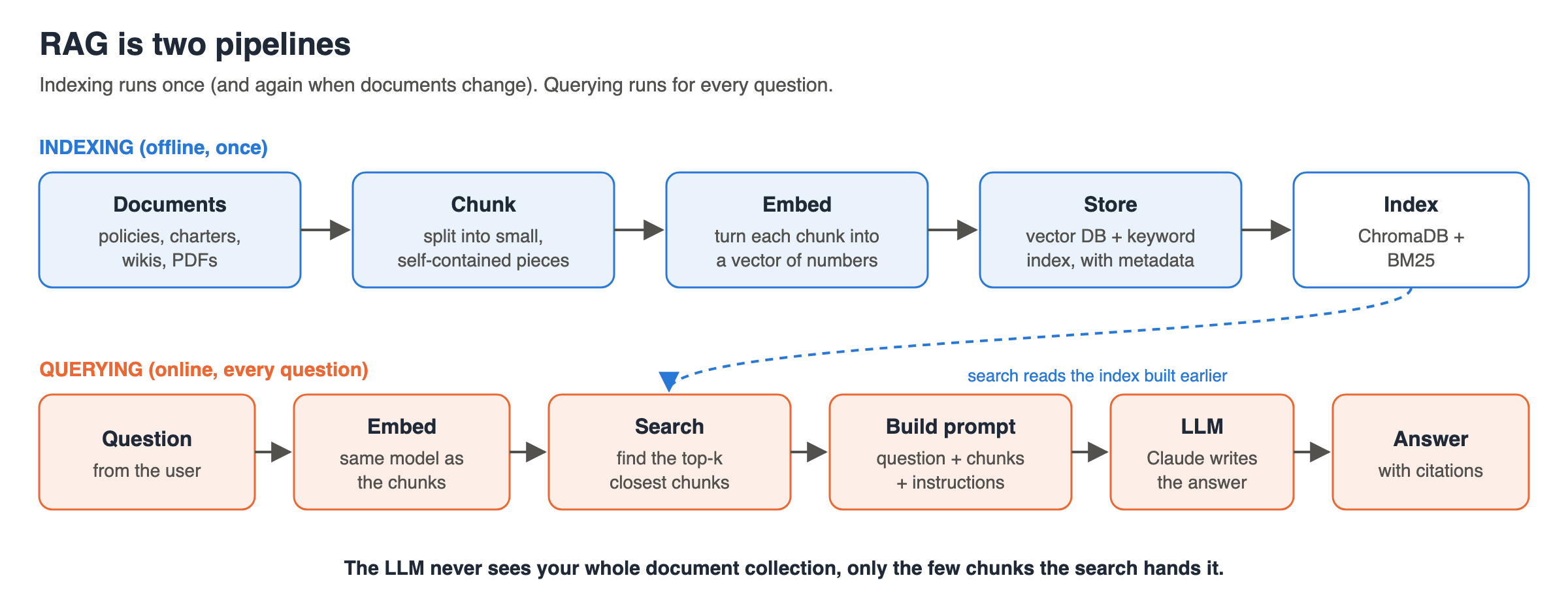
RAG is two separate pipelines:
Indexing runs once, and again whenever documents change:
Load the documents.
Chunk them into small, self-contained pieces.
Embed each chunk: turn its meaning into a list of numbers (a vector).
Store the vectors with the chunk text and metadata (document, section, date).
Querying runs for every question:
Embed the question with the same model.
Search for the chunks whose vectors are closest to the question’s vector.
Build a prompt: instructions + the retrieved chunks + the question.
Generate: the LLM answers from those chunks, citing them.
Remember: the LLM never sees your whole document collection, only the few chunks the search hands it. So the quality of those few chunks decides the quality of the answer.
Our playground: Bluepeak Tech Solutions
To learn properly, we need documents that behave like real company documents. Real ones are messy: facts split across files, IDs and codes everywhere, and the same fact in two places, one of them outdated.
So the repo contains a fictional Bengaluru IT services company, Bluepeak Tech Solutions, with 19 short documents:

I placed facts across documents on purpose, the way real knowledge is spread. For example:
The expense policy says mid-sized claims are approved by “the delivery head of the client account the project belongs to”. It names no person.
The Project Falcon charter says Falcon is for Meridian Bank. It doesn’t mention expenses.
The Meridian Bank account profile says its delivery head is Mary Fernandes. It doesn’t mention Falcon’s expenses either.
So “Who approves a ₹45,000 expense for someone on Falcon?” needs all three. Keep that question in mind; it comes back in Part 2.
Tech Stack: Python, ChromaDB (vector store), rank-bm25 (keyword search), two free local models from Hugging Face (bge-small-en-v1.5 for embeddings, bge-reranker-v2-m3 for reranking), and Claude for generation. Retrieval runs entirely on your laptop, with no API key. Only the answering step calls Claude.
git clone REPO_URL && cd rag-proj
uv venv --python 3.12 .venv && source .venv/bin/activate
uv pip install -r requirements.txt
export ANTHROPIC_API_KEY=...   # only needed for the answer step
There is nothing to start. No database server, no model server, no Docker:
ChromaDB is a library, like SQLite. It reads and writes files in
store/chroma/from inside your Python process.The two models are files.
sentence-transformersdownloads each one from Hugging Face the first time it’s needed (into~/.cache/huggingface/), then loads it and runs it on your CPU. The first run is slower for that reason.Only Claude runs elsewhere, and only in the answer step.
Pipeline 1, indexing: chunking
This is the indexing pipeline: we turn 19 documents into a searchable index. Next pipeline is the query pipeline, which uses it.
Why not embed whole documents? Because a vector is a summary of meaning. One vector for an entire expense policy blurs together reimbursable items, approval limits and deadlines. Ask about approval limits and the match is weak. Small chunks give sharp vectors and let you hand the LLM only the relevant part.
Too small is also bad. “Up to ₹10,000 | Your project manager” means nothing without the heading “Approval matrix” above it.
Think of a long train split into coaches. Each coach must make sense on its own, and each must carry the train number, or nobody knows which train it belongs to.
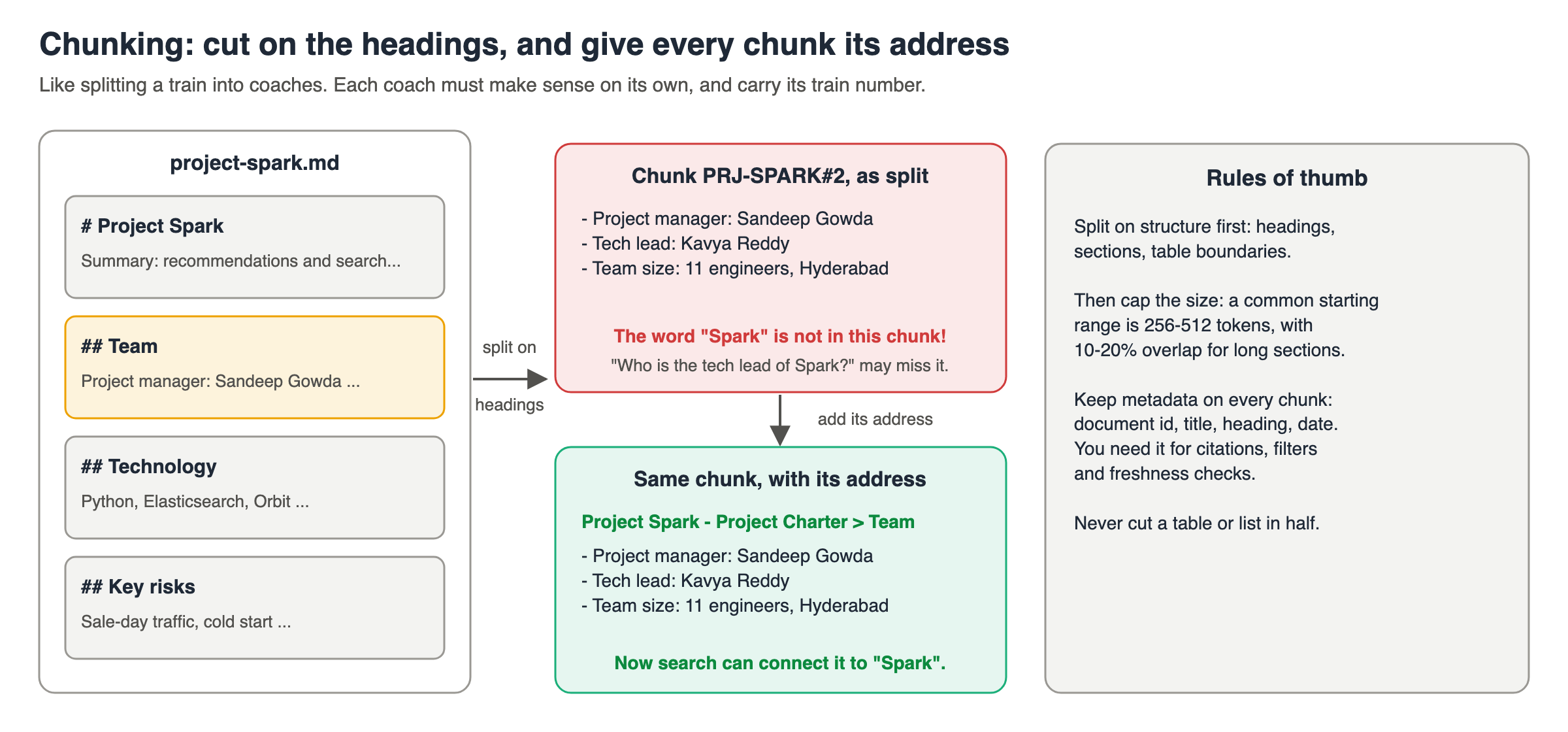
Our chunker splits on headings first (structure-aware), then caps any long section at about 200 words with a 30-word overlap:
Refer code from: # rag/chunking.py on how chunking works.
$ python 01_chunk.py
19 documents -> 65 chunks

--- ACC-CWH#1  (Account Profile - Carewell Health > Account Profile: Carewell Health), 54 words
**Carewell Health** runs 35 multi-speciality hospitals and 120 diagnostic centres across Tamil Nadu and Karnataka. ...
...
Chunk size in words: min 9, median 36, max 152
01_chunk.py is a preview: it prints the chunks and saves nothing. The next step chunks the documents again and stores them.
Two things to notice:
Every chunk keeps its metadata: document id, title, heading, type and last-updated date. Citations, permission filters and “which version is newer?” all depend on it. Don’t throw it away.
Our sections are short, so most chunks are small. With real documents, a common starting range is 256–512 tokens with 10–20% overlap. Treat that as a starting point and tune it with measurements, like everything else here.
Pipeline 1, indexing: embeddings and the vector store
What is an embedding?
An embedding model reads a piece of text and outputs a list of numbers, 384 of them for our model. Texts with similar meaning get similar numbers, even with no words in common. “Can I get money back for my home broadband?” lands close to “Internet reimbursement up to ₹1,500 a month”.
Think of it as PIN codes for meaning. Two houses in the same locality have nearby PIN codes, even if they look nothing alike. Two chunks about leave get nearby “addresses” in meaning-space, even if one says “earned leave” and the other “carry forward”.
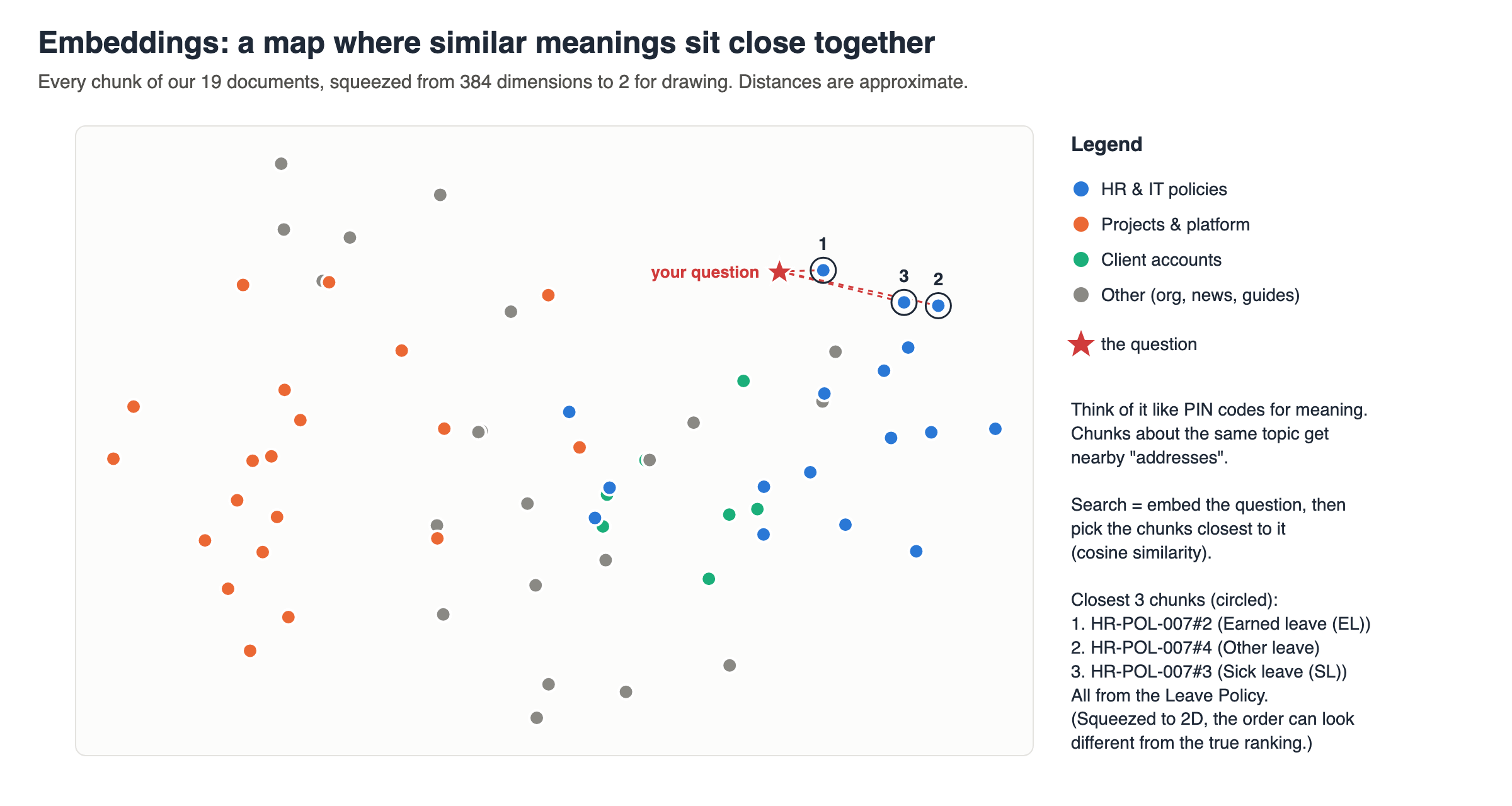
That map is real: all 65 chunks from our documents, squeezed from 384 dimensions to 2 for drawing. Policies cluster together, projects cluster together, and our leave question lands right next to the leave policy chunks.
Search then means: embed the question, and pick the chunks whose vectors point in the most similar direction (cosine similarity: 1 means same direction, 0 means unrelated).
Storing them: the vector database
A vector database stores the vectors with their text and metadata, and finds the nearest ones quickly. We use ChromaDB, which runs in-process with no server:
Refer code : # rag/retrieval.py
Two small details that matter:
Use the same embedding model for chunks and questions. Vectors from different models live in different “maps”.
BGE models expect questions to carry a short instruction prefix (
"Represent this sentence for searching relevant passages: "). It’s inrag/config.py. Check your embedding model’s card for the same kind of detail.
Which embedding model? For this blog I picked bge-small-en-v1.5: small, fast on a laptop CPU, free. The popular tutorial default all-MiniLM-L6-v2 scores lowest among small models in current rankings. For production, compare a few options on your documents. Anthropic doesn’t make an embedding model; its documentation points to Voyage AI as the recommended partner.
Run the indexing pipeline
02_index.py does all four indexing steps (load, chunk, embed, store) in one go. It builds two indexes: bluepeak_raw (chunks exactly as split) and bluepeak_titled (each chunk prefixed with its document title and heading; following sections explains why).
$ python 02_index.py
Indexed 65 chunks twice (raw and titled) in 4.1s
Each chunk is now a vector of 384 numbers, e.g. [-0.044, -0.063, -0.012, -0.047, -0.004] ...
Expect it to take longer the first time, while the embedding model downloads.
Look inside the index
An index is not magic. It’s a few files. 03_inspect_index.py shows them:
$ python 03_inspect_index.py
Files on disk:
  store/bluepeak_raw.json  (53 KB)
  store/bluepeak_titled.json  (57 KB)
  store/chroma/4439fddd-.../data_level0.bin  (163 KB)
  ...
  store/chroma/chroma.sqlite3  (952 KB)

Collections (one per index):
  bluepeak_raw: 65 chunks
  bluepeak_titled: 65 chunks

One stored record, HR-POL-007#2:
  metadata: {'heading': 'Earned leave (EL)', 'type': 'policy', 'title': 'Leave Policy', 'doc_id': 'HR-POL-007', 'updated': '2026-01-15'}
  text:     '- You earn **2 days of earned leave every month**, so 24 days a year.\n- At the end of the '...
  vector:   384 numbers, starting [-0.025, 0.025, -0.0, -0.048, 0.001]

Embedding model BAAI/bge-small-en-v1.5: cached at ~/.cache/huggingface/hub/models--BAAI--bge-small-en-v1.5
What each file is:
chroma.sqlite3holds every chunk’s text, metadata and id.The
.binfiles (one folder per collection, named with a random id) hold the vectors in an HNSW graph: an index that finds the nearest vectors without comparing the question against every chunk.The
.jsonfiles are a plain copy of the chunks. Keyword search and citations read them.
Want to see indexing happen from scratch? Delete store/ and run 02_index.py again. If you skip indexing, ask.py stops and tells you to run it first.
Pls continue here for part2 on Online retrieval pipeline and measurement. click here